
How to Add a Pedigree to Your Dog Breeder Website (Without Using PDFs)
Published:
Many breeders want to display pedigrees on their website, but are unsure of the best way to do it.
In most cases, pedigrees are uploaded as PDF files or static images. While this technically shows lineage, it often creates limitations for both visitors and breeders managing the site.
In 2026, buyers expect more than a downloadable chart. They want to explore lineage easily, view related dogs, and understand the depth of a breeding program without needing to zoom into an image or open a separate file.
This guide explains the most common ways breeders add pedigrees to their website, the drawbacks of static charts, and what a more connected, professional solution looks like.
For a broader overview of what a professional breeder website should include, see our Dog Breeder Website Checklist (2026 Edition).
Whether you raise dogs, cats, horses, or goats, the principles remain the same.
1. The Most Common Ways Breeders Add Pedigrees to Their Website
There are several ways breeders typically publish pedigrees online.
The most common approaches include:
- Uploaded PDF charts
Many breeders create a pedigree chart using software or a database and upload it as a downloadable PDF file. - Static image files
Some breeders export the pedigree as an image and display it directly on the dog’s profile page. - Screenshots from third party databases
In some cases, breeders take screenshots from external pedigree systems and upload them to their website. - Manually built tables
A smaller number of sites attempt to recreate pedigrees using basic tables or formatted text.
Each of these methods displays lineage in some form. However, they are generally static, meaning they do not adapt as your breeding program grows or as additional information is added.
For smaller programs with only a few dogs, this may seem manageable. But over time, these approaches can create limitations.
2. The Problems With Static Pedigree Images and PDFs
While PDFs and images can show ancestry, they often create a less than ideal experience for both visitors and breeders.
They are difficult to view on mobile devices
Most website visitors now browse on phones or tablets. Static pedigree charts frequently require zooming, scrolling, or downloading a file to view properly. This interrupts the user experience and can discourage exploration.
They cannot be explored interactively
With static files, visitors cannot click through to see individual dogs, related breedings, or additional information. The pedigree exists as a standalone chart rather than part of a connected system.
They are time consuming to update
If a title is earned, health testing is completed, or new information becomes available, static charts must be edited and re uploaded. As your database grows, this becomes increasingly inefficient.
They do not scale well
For breeders managing larger programs with dozens or even hundreds of dogs, manually creating and maintaining pedigree charts quickly becomes impractical.
Static files may work initially, but they do not grow with your breeding program.
3. What a Better Pedigree Experience Looks Like
A modern breeder website should allow visitors to explore lineage naturally, without needing to download files or zoom into images.
Instead of presenting pedigrees as static charts, a better approach connects each dog within the pedigree to its own profile page.
This allows visitors to:
- Click through to view individual dogs
- Explore related breedings
- See photos, titles, and background information
- Understand the depth of your breeding program
Rather than existing as a single disconnected chart, the pedigree becomes part of a connected system.
Clear Across All Devices
A well designed pedigree should be:
- Easy to read on desktop
- Clear and usable on mobile
- Consistent across all profiles
Visitors should not need to download anything or enlarge images to understand the lineage.
Designed to Grow With Your Program
As your breeding program develops, new dogs are added, titles are earned, and related breedings increase.
A connected pedigree system allows lineage to expand naturally without redesigning charts each time new information is added.
When profiles are linked and reused across breedings, your website becomes a living record of your program rather than a collection of static files.
At Breedpost, pedigrees are generated dynamically from your database. Once an individual profile is created, it can be reused across multiple breedings, and the pedigree view updates automatically. This removes manual chart creation and allows the system to grow as your database grows.
For breeders managing detailed lineage, this approach is not only cleaner visually. It is significantly more practical long term.

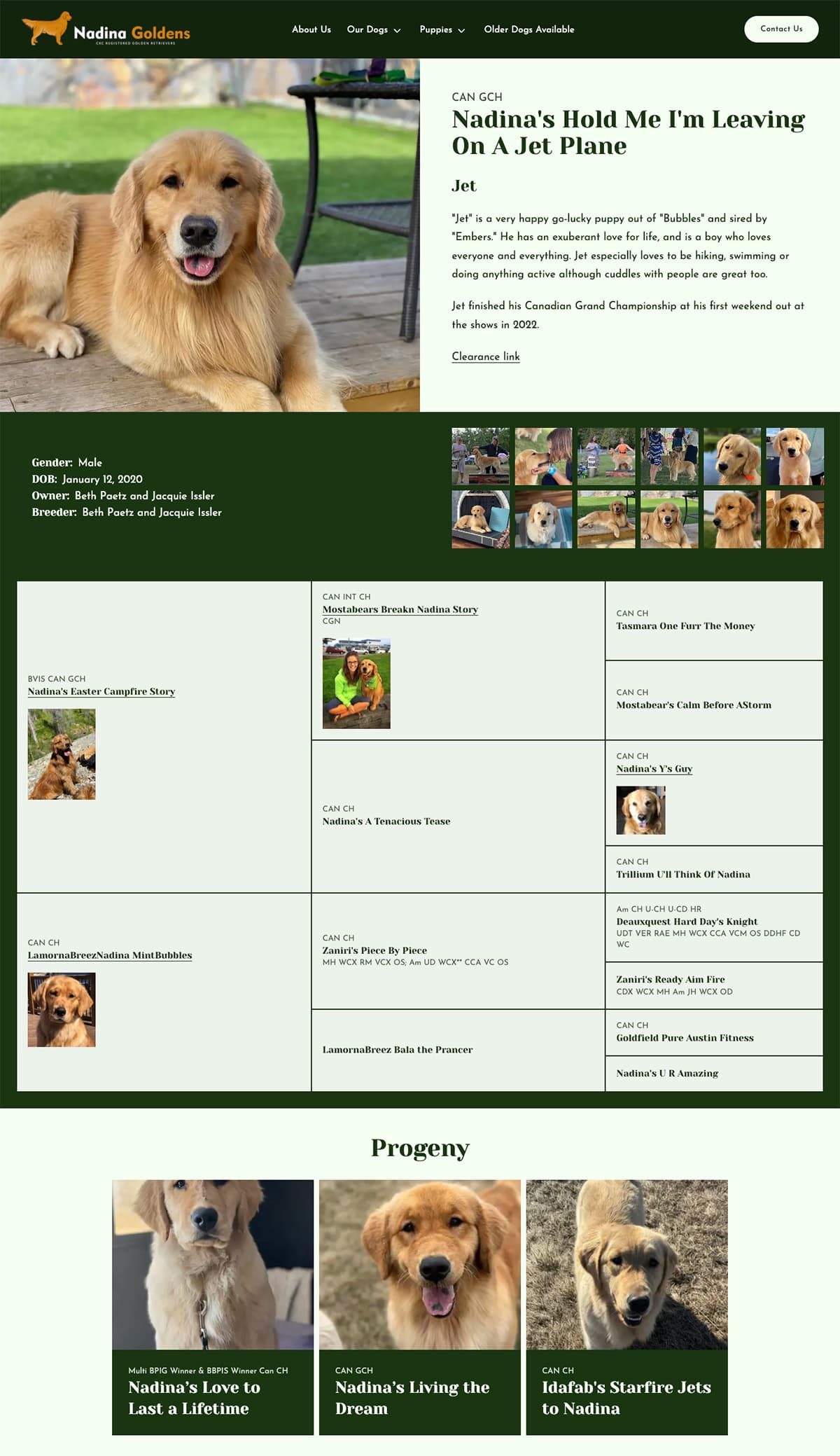
Example of a connected pedigree where dogs links to its own profile page. kabova.com
4. Why Database-Driven Pedigrees Matter
For breeders managing more than a handful of dogs, lineage quickly becomes complex.
As your program grows, you may have:
- Multiple generations in your care
- Dogs used across several breedings
- Imported lineage
- Titles and achievements accumulating over time
Manually maintaining pedigree charts in this environment becomes inefficient.
A database-driven system changes the way pedigrees are managed.
Create Once, Reuse Everywhere
When each dog has its own profile page, that information only needs to be entered once.
From there:
- The profile can be linked into multiple breedings
- The pedigree view updates automatically
- New litters inherit the correct lineage
- Historical depth builds naturally
Instead of recreating charts for every new breeding, the system draws from existing profiles.
This reduces duplication and significantly lowers the risk of errors.
Built for Growing Programs
As more individuals are added to your website, a connected system becomes more valuable.
- Over time, you begin to build:
- A multi-generation record
- Automatic progeny listings
- Related dog connections
- A searchable history of your program
Rather than becoming harder to manage, your website becomes easier to build upon.
For breeders with large databases, this approach saves time and allows new profile pages and breeding pages to be created quickly.
At Breedpost, pedigrees are generated dynamically from your database of individuals. As more dogs are entered into the system, new breedings and profile pages can be created without manually rebuilding charts each time.
For serious breeding programs, a database-driven pedigree system is not just visually cleaner. It becomes an operational advantage.
Breeding pages are often connected to litter listings or individual puppy pages.

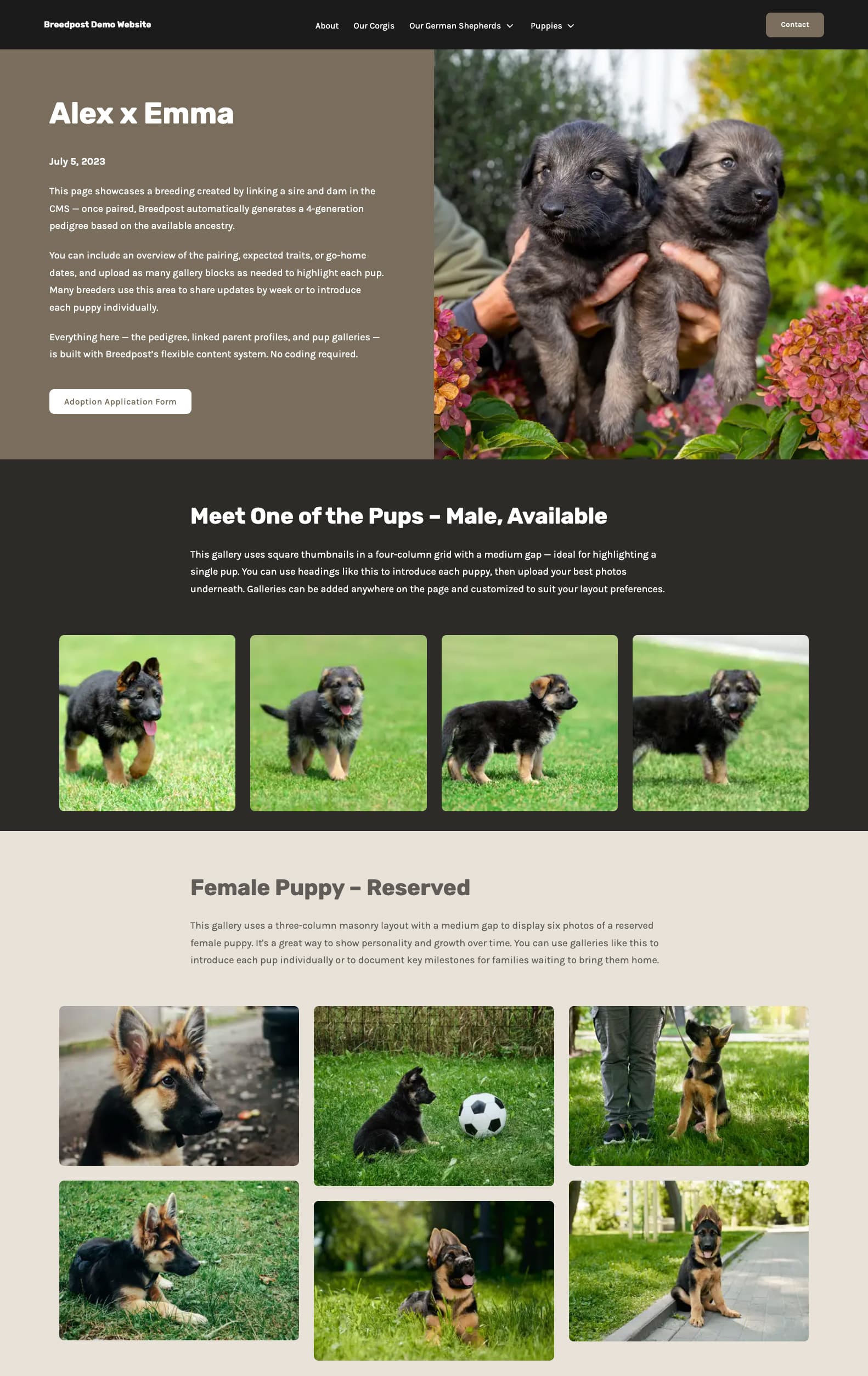
Example of a breeding page generated from linked individual profiles, drawing automatically from the database.
5. What to Look for in a Pedigree System
If you are choosing a website platform or reviewing your current setup, it is worth considering how pedigrees are handled behind the scenes.
A well designed pedigree system should do more than display names in a chart. It should support long term growth, accuracy, and usability.
Here are several features to look for.
Profile Linking
Each dog within the pedigree should link to its own individual profile page.
This allows visitors to:
- Explore related dogs
- View photos, titles, and health information
- Understand how individuals connect across generations
Without profile linking, the pedigree remains isolated and disconnected from the rest of your website.
Multi-Generation Support
Your system should allow for multiple generations to be displayed clearly.
Whether you show three, four, or more generations, the layout should remain readable and responsive across devices.
As your breeding program grows, you should not be limited by a fixed chart format.
Mobile Readability
Pedigrees must function well on mobile devices.
Visitors should be able to:
- View names clearly
- Navigate between profiles
- Understand lineage without zooming or downloading files
Mobile usability is no longer optional.
Ease of Updates
Titles are earned. Health testing is completed. New information becomes available.
A good pedigree system should allow updates to be made once, at the profile level, with changes reflected wherever that individual appears.
This reduces duplication and keeps information consistent across your website.
Connected Breeding Pages
Ideally, your pedigree system should connect directly to breeding announcements or litter pages.
When sire and dam profiles are linked, the pedigree should generate automatically rather than being rebuilt manually for each new litter.
This creates efficiency and reduces errors over time.
A pedigree system should not feel like an add on. It should feel integrated into the structure of your website.
For breeders focused on lineage, preservation, and long term program development, the way pedigrees are handled can significantly impact both visitor experience and ongoing management.
Final Thoughts
Pedigrees are central to many breeding programs. They represent planning, selection, and long term commitment to improving a breed.
How those pedigrees are presented on your website matters.
Static PDFs and image charts may display lineage, but they often limit usability, scalability, and long term maintenance. As programs grow, these limitations become more noticeable.
A connected, database-driven approach allows pedigrees to evolve naturally alongside your breeding program. Individual profiles, breeding pages, and multi-generation views work together, creating a more informative and professional experience for visitors.
If you are reviewing your current website or considering a new platform, it is worth evaluating how pedigrees are handled behind the scenes.
To see how Breedpost manages connected profiles, multi-generation pedigrees, and breeding pages, you can explore the Features page.
Related articles
25 February 2026
Dog Breeder Website Checklist (2026 Edition)
19 March 2026